How to use Remote Desktop (RDP) ?
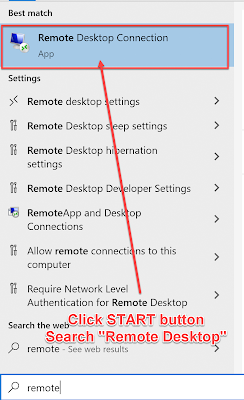
Remote Desktop Protocol ( RDP ) is a proprietary protocol developed by Microsoft which provides a user with a graphical interface to connect to another computer over a network connection. [1] The user employs RDP client software for this purpose, while the other computer must run RDP server software. How to use Remote Desktop? When you buy RDP from http://email365.me or http://email365.site you will receive the RDP INFO: IP: 103.89.89.150:53661 Username: administrator Password: xxx_xxx Follow these steps to remote the RDP INFO 1. Click ☝ Start button of Windows - Search "Remote Desktop" 2. Enter 👀 the IP and username 3. Enter 👀 the password of RDP 4. Check 👌 "Don't ask me again for connections to this computer" if the message box showed 5. Connected to the RDP. Congrats 😀 Please visit & checkout via our site: http://email365.me or http://email365.site